




Mixing streaming and batching technologies might seem a bit counterintuitive, but it’s a common scenario when you’re tasked with modernizing legacy systems. I’ve encountered this a few times, mostly in systems that rely on processing large files in batches, often with limited flexibility.
The typical setup involves ingesting a large file (we’re talking gigabytes here) that is transformed into events, running some transformations, and then generating a consolidated output file. But how can you create these output files efficiently and without causing errors? Let’s have a look.
The use case
For this proof of concept (POC), I’ll be working with a relatively simple example:
- Input: A CSV file containing a list of people.
- Processing: Filter the list to keep only adults (those over 18).
- Output: A new file with the filtered adult data.
If you’d like to dive into the code immediately, check out this GitHub repo with the demo. Otherwise, read on to get some background information and a detailed explanation!
The solution: a three-part architecture
In this case, the challenge is to integrate streaming processing for real-time use cases while also accommodating the batch-oriented nature of the output generation. To address this, I built a project that combines Spring Boot, Spring Batch, and Kafka Streams. It consists of three main components:
- Ingestion: A Spring Batch application that reads the input file and publishes each line as an event to a Kafka topic.
- Stream: A Spring Boot application that uses Kafka Streams to process the events, filter for adults, and send the results to a new Kafka topic.
- Batch: Another Spring Boot application that consumes the processed events from Kafka, aggregates them, and then uses Spring Batch to generate the final output file.
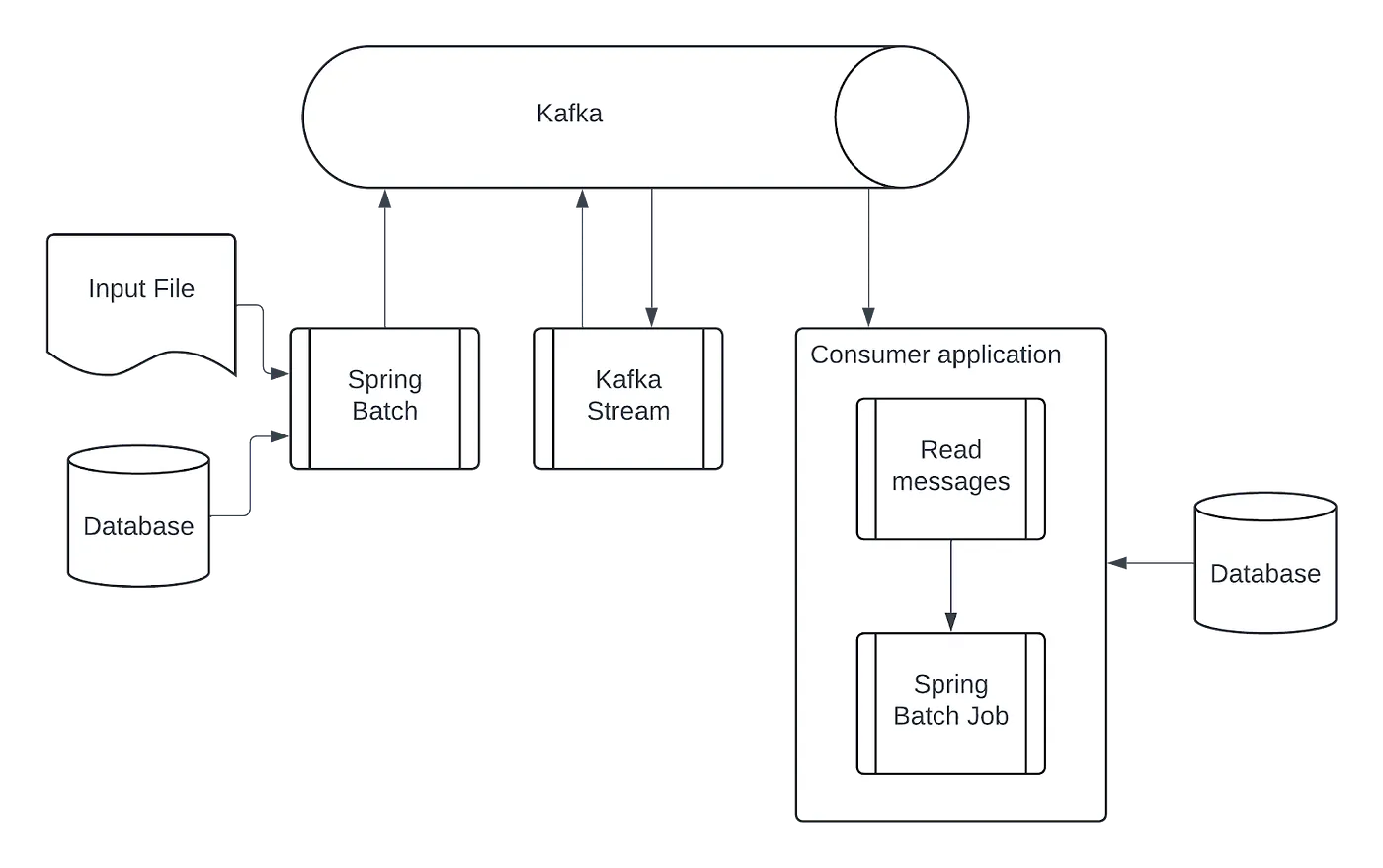
At this point, you might be wondering why I don’t just do everything within the Kafka Streams app. Well, storing and processing massive batches entirely in a state store isn’t always practical or efficient. Plus, generating a potentially large output file directly from a stream thread could lead to timeouts or unwanted blocking.
The ingestion application
This application will process the file and post the content into Kafka. Luckily, Spring Batch has all the tools we need and offers a production-ready solution that is fairly low code and highly configurable. Let’s have a look at how we can set things up.
The backbone of the application is configured in the BatchConfiguration class, where we will define the steps that we need to take to process the input file.
The first step transforms each line of the CSV into a BatchPerson entity, which encapsulates the data from a single line along with a generated batch ID for tracking purposes. Instead of sending these entities directly to Kafka, we’ll persist them to a database to ensure data integrity in case errors occur during processing or if we need to reprocess the file. This way, we avoid ending up with duplicate data on our Kafka cluster.
Here’s how we define the ingestion step using Spring Batch’s StepBuilder
@Bean
public Step ingestFileStep(
     JobRepository jobRepository,
     JdbcTransactionManager transactionManager,
     FlatFileItemReader<Person> personCsvReader,
     ItemProcessor<Person, BatchPerson> personItemProcessor,
     ItemWriter<BatchPerson> personTableWriter) {
 return new StepBuilder("ingestFileStep", jobRepository)
         .<Person, BatchPerson>chunk(100, transactionManager)
         .reader(personCsvReader)
         .processor(personItemProcessor)
         .writer(personTableWriter)
         .build();
}
public Step ingestFileStep(
JobRepository jobRepository,
JdbcTransactionManager transactionManager,
FlatFileItemReader<Person> personCsvReader,
ItemProcessor<Person, BatchPerson> personItemProcessor,
ItemWriter<BatchPerson> personTableWriter) {
return new StepBuilder("ingestFileStep", jobRepository)
.<Person, BatchPerson>chunk(100, transactionManager)
.reader(personCsvReader)
.processor(personItemProcessor)
.writer(personTableWriter)
.build();
}
With the data safely stored in the database, the next step is to publish it to Kafka. For this, we leverage another Spring Batch step, this time using the KafkaItemWriter. This handy class is designed for producing Kafka messages with transactional guarantees. We’ll key the messages by their batch ID, ensuring that all events for a given input file are published to the same Kafka topic partition, preserving the order for downstream processing.
@Bean
public Step produceMessageStep(
     JobRepository jobRepository,
     JdbcTransactionManager transactionManager,
     JdbcCursorItemReader<BatchPerson> personTableReader,
     ItemProcessor<BatchPerson, PersonParsed> batchPersonItemProcessor,
     KafkaItemWriter<String, PersonParsed> personParsedWriter) {
  return new StepBuilder("produceMessageStep", jobRepository)
    .<BatchPerson, PersonParsed>chunk(100, transactionManager)
    .reader(personTableReader)
    .processor(batchPersonItemProcessor)
    .writer(personParsedWriter)
    .build();
}
public Step produceMessageStep(
JobRepository jobRepository,
JdbcTransactionManager transactionManager,
JdbcCursorItemReader<BatchPerson> personTableReader,
ItemProcessor<BatchPerson, PersonParsed> batchPersonItemProcessor,
KafkaItemWriter<String, PersonParsed> personParsedWriter) {
return new StepBuilder("produceMessageStep", jobRepository)
.<BatchPerson, PersonParsed>chunk(100, transactionManager)
.reader(personTableReader)
.processor(batchPersonItemProcessor)
.writer(personParsedWriter)
.build();
}
Finally, to signal the completion of ingestion for a specific file, we’ll publish a PersonFileParsed event. This event is crucial for the downstream Batch application to know when all data related to a batch has been received. Like the previous events, this event will also be keyed by the batch ID and sent to the same Kafka topic.
The stream application
The Stream application is quite straightforward. It consumes the PersonParsed events from Kafka, uses an AgeFilterProcessor to filter for adults, and forwards the filtered events to the adults topic. Importantly, it also passes through the PersonFileParsed event, so we can be sure that the Batch application is notified of file completion.
var specificValueSerde = avroSerdeFactory.specificAvroValueSerde();

builder.stream("persons", Consumed.with(Serdes.String(), specificValueSerde))
  .process(AgeFilterProcessor::new)
  .to("adults", Produced.with(Serdes.String(), specificValueSerde));

private class AgeFilterProcessor
    implements Processor<String, SpecificRecord, String, SpecificRecord> {
  private ProcessorContext<String, SpecificRecord> context;

  // ...

  @Override
  public void process(Record<String, SpecificRecord> record) {
    var value = record.value();
    if(value instanceof PersonParsed person) {
      if(person.getBirthDate().plusYears(18).isBefore(LocalDate.now())) {
        context.forward(record.withValue(Adult.newBuilder()
          .setFirstName(person.getFirstName())
          .setLastName(person.getLastName())
          .setBatchId(person.getBatchId())
          .setAddress(person.getAddress())
          .build()));
      }
    }
    else {
      context.forward(record);
    }
  }
}
builder.stream("persons", Consumed.with(Serdes.String(), specificValueSerde))
.process(AgeFilterProcessor::new)
.to("adults", Produced.with(Serdes.String(), specificValueSerde));
private class AgeFilterProcessor
implements Processor<String, SpecificRecord, String, SpecificRecord> {
private ProcessorContext<String, SpecificRecord> context;
// ...
@Override
public void process(Record<String, SpecificRecord> record) {
var value = record.value();
if(value instanceof PersonParsed person) {
if(person.getBirthDate().plusYears(18).isBefore(LocalDate.now())) {
context.forward(record.withValue(Adult.newBuilder()
.setFirstName(person.getFirstName())
.setLastName(person.getLastName())
.setBatchId(person.getBatchId())
.setAddress(person.getAddress())
.build()));
}
}
else {
context.forward(record);
}
}
}
The batch application
This application is where the final steps of our process take place.
- First, a
@KafkaListenerconsumes theadultevents from Kafka. To optimize database writes, I'm using Spring JDBC for efficient batch inserts. - After receiving a
PersonFileParsedevent, the listener triggers a Spring Batch job, passing along the associated batch ID.
@Transactional
@KafkaListener(topics = "adults", batch = "true")
public void process(ConsumerRecords<String, SpecificRecord> records) {
  var sql = "insert into ADULT values (? , ?, ? , ?)";
  var args = new ArrayList<Object[]>();

  for(var record : records) {
    var value = record.value();
    if(value instanceof Adult adult) {
      args.add(new Object[] {
        adult.getBatchId(),
        adult.getFirstName(),
        adult.getLastName(),
        adult.getAddress()
      });
    }
    else if(value instanceof PersonFileParsed parsed) {
      TransactionSynchronizationManager.registerSynchronization(new TransactionSynchronization() {

        @Override
        public void afterCommit() {
          jobService.execute(parsed.getBatchId());
        }

      });
    }
  }

  jdbcTemplate.batchUpdate(sql, args);
}
@KafkaListener(topics = "adults", batch = "true")
public void process(ConsumerRecords<String, SpecificRecord> records) {
var sql = "insert into ADULT values (? , ?, ? , ?)";
var args = new ArrayList<Object[]>();
for(var record : records) {
var value = record.value();
if(value instanceof Adult adult) {
args.add(new Object[] {
adult.getBatchId(),
adult.getFirstName(),
adult.getLastName(),
adult.getAddress()
});
}
else if(value instanceof PersonFileParsed parsed) {
TransactionSynchronizationManager.registerSynchronization(new TransactionSynchronization() {
@Override
public void afterCommit() {
jobService.execute(parsed.getBatchId());
}
});
}
}
jdbcTemplate.batchUpdate(sql, args);
}
3. The batch job then uses a JdbcCursorItemReader to retrieve all adult records associated with the specific batch ID. Finally, a FlatFileItemWriter generates the output file with the filtered data.
@Bean
public Step writeFileStep(
    JobRepository jobRepository,
    JdbcTransactionManager transactionManager,
    JdbcCursorItemReader<Adult> personTableReader,
    FlatFileItemWriter<Adult> billingDataFileWriter) {
  return new StepBuilder("writeFileStep", jobRepository)
    .<Adult, Adult>chunk(100, transactionManager)
    .reader(personTableReader)
    .writer(billingDataFileWriter)
    .build();
}
public Step writeFileStep(
JobRepository jobRepository,
JdbcTransactionManager transactionManager,
JdbcCursorItemReader<Adult> personTableReader,
FlatFileItemWriter<Adult> billingDataFileWriter) {
return new StepBuilder("writeFileStep", jobRepository)
.<Adult, Adult>chunk(100, transactionManager)
.reader(personTableReader)
.writer(billingDataFileWriter)
.build();
}
Things to keep in mind
One important thing to note is that this approach isn’t perfectly elastic at the file level. Because we’re keying all events for a batch with the same ID, they’ll end up on the same topic partition and be processed by a single thread.
To improve parallelism, you could explore a different keying strategy. For instance, the PersonFileParsed event could include metadata about the file’s structure (like the number of records or logical chunks), allowing you to split the data across multiple partitions. Of course, you’d need to update the Batch application to handle this, potentially adding logic to ensure all data for a batch is received before starting the final file generation.
Also, keep in mind that this is a proof-of-concept implementation. Before going to production, you’d definitely want to add error handling, validation, and resilience mechanisms.
Running the sample application
Want to try it out yourself? The project includes a handy docker-compose file with all the required dependencies. You can manage the Kafka cluster using a Conduktor console (accessible on port 8080). Just don’t forget to create the persons and adults topics before starting the Ingestion, Stream, and Batch applications!
To initiate the process, send a POST request to http://localhost:8084/job/execute. Include your CSV file as form-data with the parameter name file. You can find an example CSV file through this link. If everything runs smoothly, you’ll find the generated output file in the files folder of the Batch project.
Wrapping things up
So, that’s my take on mixing streams and batches for legacy system upgrades. Of course, I’m always happy to learn from others. If you’ve dealt with similar challenges, I’d love to hear about your experiences and the solutions you came up with. Share your thoughts in the comments below!




