

Mastering Flink Job and Task Managers

Writing Kafka Streams applications doesn't have to be painful. In this blog, Benjamin explains how you can use Spring Boot to simplify your Kafka Streams development workflow. Discover configuration tips, custom annotations for streamlined testing, and how to leverage Spring's magic for smoother Avro integration.

Key takeaway #1

A Flink cluster operates on a master-worker model, with a single Job Manager coordinating tasks and one or more Task Managers executing them.

Key takeaway #2

Deploying an application requires packaging it into a JAR file and submitting it to the cluster using the flink run command-line tool.

Key takeaway #3

The Flink web dashboard is essential for monitoring the cluster's health, verifying that Task Managers are connected, and checking the status of running jobs.

Mastering Flink Job and Task Managers

Writing Kafka Streams applications doesn't have to be painful. In this blog, Benjamin explains how you can use Spring Boot to simplify your Kafka Streams development workflow. Discover configuration tips, custom annotations for streamlined testing, and how to leverage Spring's magic for smoother Avro integration.

Key takeaway #1

A Flink cluster operates on a master-worker model, with a single Job Manager coordinating tasks and one or more Task Managers executing them.

Key takeaway #2

Deploying an application requires packaging it into a JAR file and submitting it to the cluster using the flink run command-line tool.

Key takeaway #3

The Flink web dashboard is essential for monitoring the cluster's health, verifying that Task Managers are connected, and checking the status of running jobs.

Mastering Flink Job and Task Managers

Writing Kafka Streams applications doesn't have to be painful. In this blog, Benjamin explains how you can use Spring Boot to simplify your Kafka Streams development workflow. Discover configuration tips, custom annotations for streamlined testing, and how to leverage Spring's magic for smoother Avro integration.

Key takeaway #1

A Flink cluster operates on a master-worker model, with a single Job Manager coordinating tasks and one or more Task Managers executing them.

Key takeaway #2

Deploying an application requires packaging it into a JAR file and submitting it to the cluster using the flink run command-line tool.

Key takeaway #3

The Flink web dashboard is essential for monitoring the cluster's health, verifying that Task Managers are connected, and checking the status of running jobs.

In a previous post, I discussed the Flink Datastream API and included a demo project. Running the main class of the JAR file as is may work, but it’s better to run it in a Flink cluster instead. But what is a Flink cluster anyway, and where can you get one? Let’s find out!

Installing Flink

If you want to follow along, download the Flink executables from this link and add the bin folder to your PATH.

If you’re running this from a Windows environment, you’ll have to use a Unix-like command line like cygwin.

Flink cluster

A Flink cluster is a distributed system for processing large-scale data streams in real-time using Apache Flink. It has several parts that each have a vital role in making sure the stream processing is efficient, elastic and resilient to errors.

Job Manager

The Job Manager is the master node of a Flink cluster. It is responsible for coordinating the execution of Flink jobs, managing resources and overseeing task execution. It also handles checkpoints to monitor stream positions and save points to keep the state of a streaming job consistent.

You can start a Job Manager with the following command:

jobmanager.sh start

If the operation is successful, the web dashboard will be available at http://localhost:8081.

Task Manager

Task Managers are the worker nodes in a Flink cluster. They execute the task assigned by the Job Manager while managing the task’s memory and network buffers, communicating with other Task Managers for data shuffling and state sharing, and reporting task status and progress to the Job Manager.

For the demo project from my previous post, we will need at least two Task Managers, which we can start by executing the following command twice:

taskmanager.sh start

The Task Manager is supposed to receive a resource ID automatically, but this doesn’t (always) work on Windows. To fix this, you can configure the taskmanager.resource-id property in conf/flink-conf.yaml.

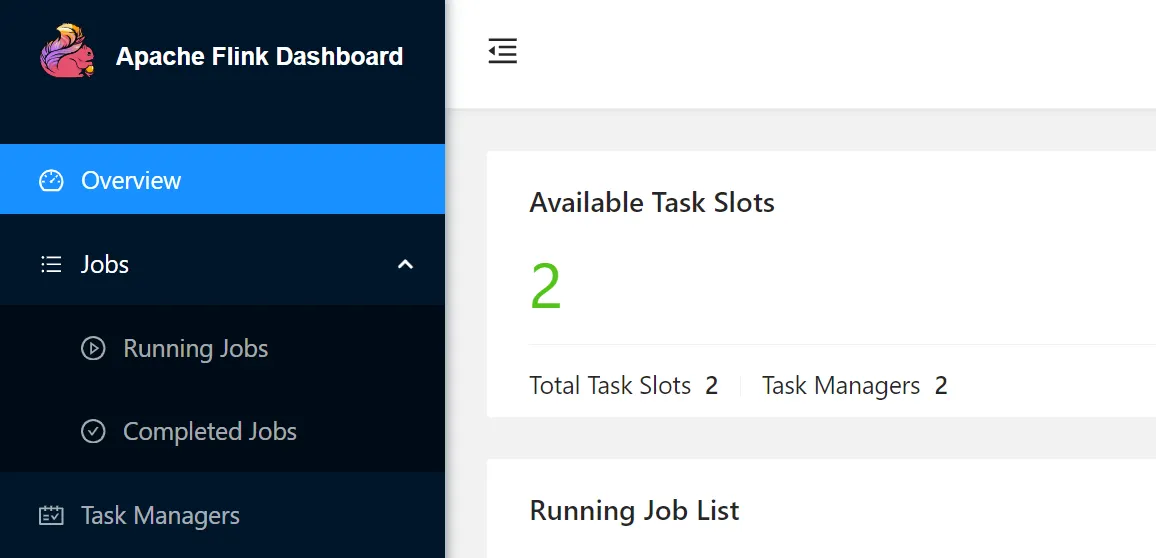
After the Task Managers have been initialized, they should be visible in the web UI. This means they are ready to accept jobs.
Kafka

We need a Kafka environment to connect our Flink Jobs to, and there are various options available to run a Kafka cluster locally.

I’m going to use the Conduktor one, which comes with a console and a Redpanda cluster: https://www.conduktor.io/get-started/.

Before proceeding, make sure that the following topics exists:

  • cms_person
  • analytics_person
  • person

Deploying Jobs

Build project First

clone the git repository containing the demo from this GitHub repo and build the project with the following command

We value your privacy! We use cookies to enhance your browsing experience and analyse our traffic.
By clicking "Accept All", you consent to our use of cookies.
Dark blue outline of a cookie icon.
